

Context
Individual Project / 6 Weeks / Master's Project
My Role
To increase data size, I used raw inputs from our 6-person group, including me, but the analysis was done individually.
Methods
Heuristic Evaluation / Quantitative Analysis / Qualitative Analysis / Accessibility Evaluation
Tools



THE GOAL
Assessing the Louis Vuitton Website's Usability and Accessibility
I assessed the website's usability and accessibility to understand how well it meets user needs.
I aimed to gain insights that could make the site more user-friendly and improve the overall shopping experience.
FINAL OUTCOME
Redesign Recommendations
Based on all of the evaluations I conducted, I redesigned the most problematic parts of the website.


PROCESS
1.0 Heuristic Evaluation
How Did I Conduct Heuristic Evaluation?
Jakob Nielsen's 10 principles for interaction design, known as "heuristics," are used as guidelines during the evaluation.
The tasks for the heuristic evaluation are divided among the 6 of us based on the top user tasks, the parts users are likely to interact with when they visit the site.
After collecting data from 5 others, I created a line graph to see the total number of issues and how they were distributed across the heuristic principles.
Top Tasks
1- Returns
2- Checkout
3- Delivery
4- Sizing Information
5- Search
6- Image
7- Product Description
8- Deals
9- Sales
10- Customer Reviews
11- Filtering

Heuristic Evaluation Findings
Analysing the Heuristic Findings
To understand where users mostly face issues in terms of heuristics, I analysed the issues by task along with their severity levels.
Looking at how the 61 issues were distributed across tasks helped me decide which ones to test further in the quantitative analysis.

Number and Severity of Heuristic Issues Per Task
2.0 Quantative Analysis
How Did I Conduct Quantitative Analysis?
The evaluation was conducted with 6 novice users (each of us interviewed one person) who had not visited this website before.
Each task was read aloud to the user and asked to use the investigator's computer. The sessions were recorded via Microsoft Teams.
The participants' effectiveness, efficiency, and satisfaction were measured based on specific criteria under controlled conditions.
Why Quantitative Analysis?
To gather consistent and reliable data
To understand how the heuristic issues affected real users
To compare the severity of the problems with our findings from the heuristic evaluation

The Tasks for Quantitative Analysis
Quantitative Analysis Findings
The recordings were reviewed to measure errors made, task times, and lostness scores. The SUS score was calculated using the SUS rating sheet filled out by each user.
The Outcome
Since I couldn’t fully confirm the heuristic issues, I explored them further through qualitative testing.

Quantitative Analysis Findings
3.0 Qualitative Analysis
How Did I Conduct Qualitative Analysis?
The evaluation was conducted with 6 novice users (each of us interviewed one person) who have no design background and are either British or have lived in the UK for a significant amount of time.
Each participant was recorded on Microsoft Teams with their camera on to capture reactions and facial expressions.
Participants completed tasks on the website while being observed.
They were asked to “think aloud” to share their thoughts and feelings during the tasks.

Pictures from My Qualitative Evaluation
Why Qualitative Analysis?
To add depth to our quantitative and heuristic findings
To observe users’ real-time reactions and behaviours during tasks
To understand users' feelings about specific interactions, even when they don’t express them verbally

The Tasks for Qualitative Analysis
Qualitative Analysis Findings
The identified issues were grouped under effectiveness, efficiency, and satisfaction, then prioritised based on how many users experienced them and how important their impact was.

Qualitative Analysis Findings on the Website
(Click on the image to make it bigger)


4.0 Accessibility Evaluation
How Did I Conduct Accessibility Evaluation?
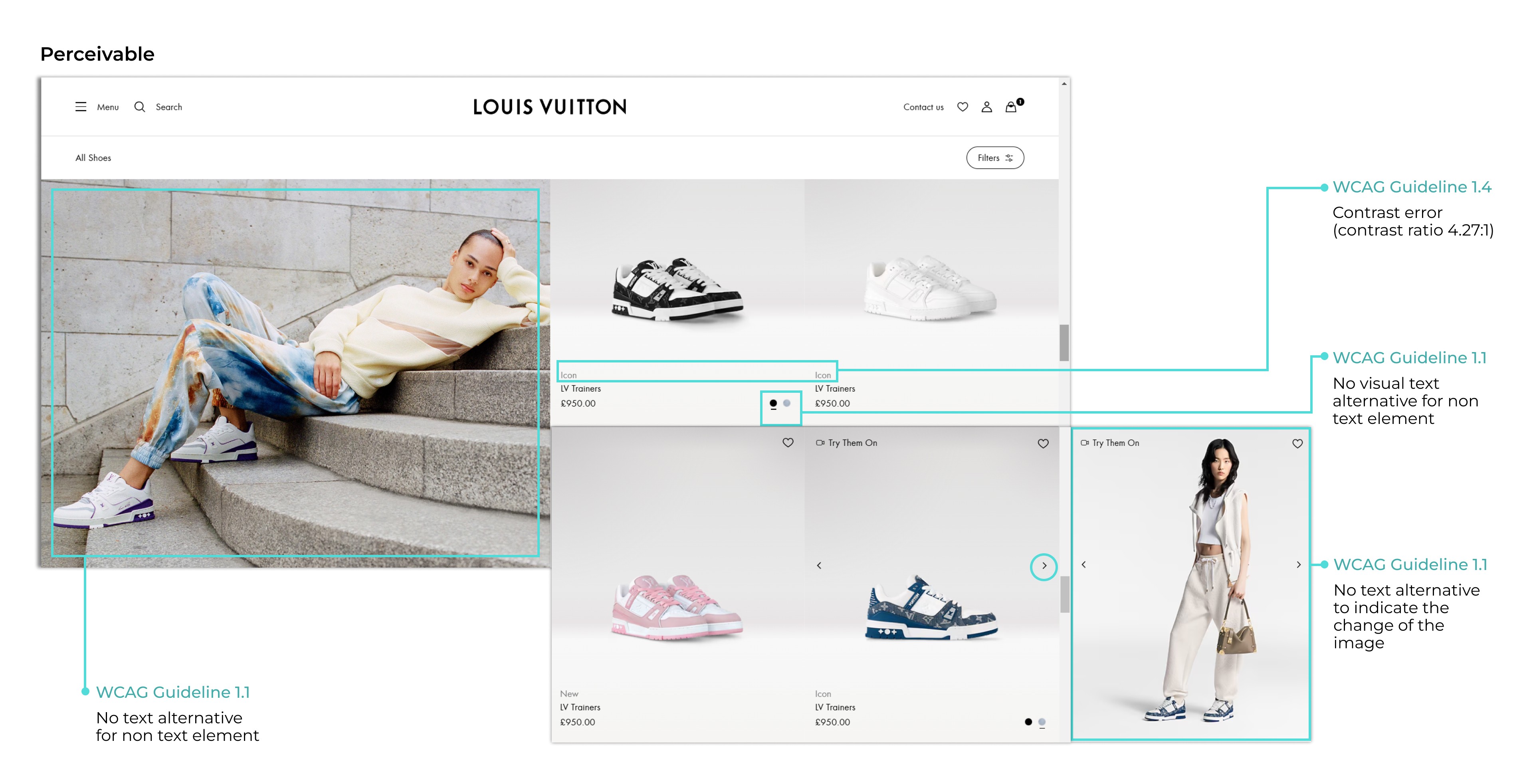
I started with a manual evaluation using WCAG 2.2 guidelines (W3.org, 2023).
Continued with an automated evaluation using the WAVE tool (WebAIM, 2021) to support my findings and catch any missed issues.
Why Accessibility Evaluation?
To verify whether usability problems identified in other evaluations also affect accessibility.
To ensure that proposed solutions improve both user experience and inclusiveness for all users.

The Tasks for Accessibility Evaluation
Accessibility Evaluation Findings
The identified issues were grouped under effectiveness, efficiency, and satisfaction, then prioritised based on how many users experienced them and how important their impact was.

Accessibility Evaluation Findings on the Website
(Click on the image to make it bigger)


5.0 Analysis
Prioritising the Insights
The extracted insights were prioritised using a 2x2 matrix based on users' ability to complete the task and the frequency of the issue, as identified through both quantitative and qualitative data.

Prioritization Matrix of Insights
1- No Visibility of the Next Available Store
There is no indicator of availability in nearby stores. Users must re-enter locations repeatedly, creating a time-consuming, trial-and-error process that increases the risk of drop-off.
2- Unavailable Items in the Product Gallery
The gallery displays unavailable items without an indicator. Users must click into each product to check availability and then return to the gallery, which feels repetitive and discouraging. After several failed attempts, they are more likely to give up searching.
3- Lack of Navigation Cues
Without back arrows or breadcrumbs, users feel lost when trying to return to previous pages. This confusion may cause them to restart their browsing and eventually leave the site.
4- Weak Error Prevention at Checkout
Postcode, email, and phone number errors are not corrected during checkout. Users face delays and frustration at the final step, often abandoning the process after finding the product they want.
5- Unclear Product Descriptions
Unconventional terms and categories reduce readability and slow recognition, especially for users with dyslexia. This lack of clarity can affect purchase decisions and discourage users from continuing.
6.0 The Outcome
Redesigning the Pages in Light of the Prioritised Insights
Jump back to the solution to see the redesign recommendations.
REFLECTION
Limitations & Challenges
Limited time due to module schedule.
Hard to confirm the severity of heuristic issues without users.
Some problems overlapped multiple principles, which created uncertainty.
Limited experience in accessibility made applying WCAG guidelines difficult.
What I’d Do Differently
Do a trial run of quantitative tasks and adjust wording until they work.
Split heuristic problems and decide which to test with quantitative and which with qualitative.
Mindset Change
I used the methods to support each other instead of relying on one.
I treated task creation as an iterative process: test, refine, and repeat.
I realised the value of qualitative insights as much as quantitative data.
I approached accessibility as part of usability, not something separate.